

USNJMon: Monitoring NTFS File Changes for Threat Hunting
Introduction
This past week, I attended the fantastic SANS FOR508: Advanced Incident
Response, Threat Hunting, and Digital Forensics class. I enjoy learning about
all of the artifacts available to hunters that attackers miss.
For example, NTFS has at least two metadata files which are frequently used
by forensicators to reconstruct what happened on disk: the MFT (Master File
Table) and USN (Update Sequence Number) Journal. NTFS metadata can preserve
evidence of file activity even after files are deleted or their contents are
wiped, depending on what metadata remains.
The USN Journal allows Windows and its applications to discover which files
have changed without rescanning the filesystem.
USN Journal data is accessible through Windows APIs and forensic tools, but
it is not exposed as ordinary Windows event-log telemetry by default.
USNJMon makes that data available through familiar collection and analysis
workflows.
What if we could make this information more easily accessible to hunters and
forensicators? In this post, I will share a new utility I created called
USNJMon, which converts USN Journal records
from one or more volumes into Windows event logs for consumption in Event Viewer
or downstream in a SIEM.
Huge shoutout to @carlos_cajigas, who
taught the course and shared this idea.
Caveat: I share this only as a proof-of-concept with no guarantees of completeness or correctness. I find it more important to share early and test out ideas than to wait for a fully baked product. I strongly encourage PRs and/or forks!
USN Journal
First, let’s discuss more details about the USN Journal, what it contains, its
forensic value, and how it is consumed today.
The key fields are:
- USN: A monotonically increasing journal position
- FRN (and Parent): A reference to the file’s MFT record (or parent directory)
- Reason: Description of the change (described in detail below)
- Filename: Name of the file or directory
- Timestamp: UTC timestamp of the journal record
- SourceInfo: Flags providing additional context about the change, such as data-management or replication activity; not the originating process or user.
Common reasons in a USN Journal entry include:
- Data changes: overwritten, extended, or truncated
- File lifecycle: created, deleted, or renamed (old/new name)
- Metadata changes: attributes, security, or basic information changed
- Other changes: hard links, compression, or encryption
Multiple reason flags can be combined in a single journal record.
These reasons can reveal file activity that other data sources may not capture. Forensics pros currently use a tool like Velociraptor to query the USN Journal for the change information. However, it would be nice to have this information collected continuously and available in a format which is already familiar to analysts.
USNJMon
Windows Event Logs establish a central location to collect and view Windows and application events. USNJMon is a utility and service to convert USN Journal change information into distinct events in its own event log, stored in EVTX format.
flowchart LR
    A[NTFS volume<br/>USN Journal] --> B[USNJMon]
    B --> C[Windows event-log channel]
    C --> D[Collector / SIEM]
It has been curated1 in Rust and tries to be performant. Event Logs come with a configurable maximum size before rotation. Depending on the average number of events per second, a log file capped at 1 GB could retain anywhere from several hours to several days of data.
Modes: Convert and Monitor
Download the latest release to try USNJMon.
You can run USNJMon in two modes: Convert and Monitor. Convert is intended for
users who have access to an extracted USN Journal that they want to parse as an
event log.
You can run .\usnjmon.exe convert .\journal.usnj .\journal.evtx to perform the
conversion. This produces an EVTX file that you can open in Event Viewer.
Note: In this example, journal.usnj is an extracted copy of the $J data
stream from the NTFS $Extend\$UsnJrnl metadata file, obtained with an
NTFS-aware forensic tool such as FTK Imager. The output filename and extension
depend on the extraction tool.
In Monitor mode, you install USNJMon as a service which reads the USN Journal
directly from the live volume and keeps feeding an event log; no manual journal
extraction is needed. The resulting events can be forwarded to your SIEM
alongside other Windows events.
By default, the event logs will arrive in Applications and Services Logs →
USNJMon → Operational.
It would mean a lot to me if you tried it out and told me what you think! Share
your feedback on GitHub.
Scenario
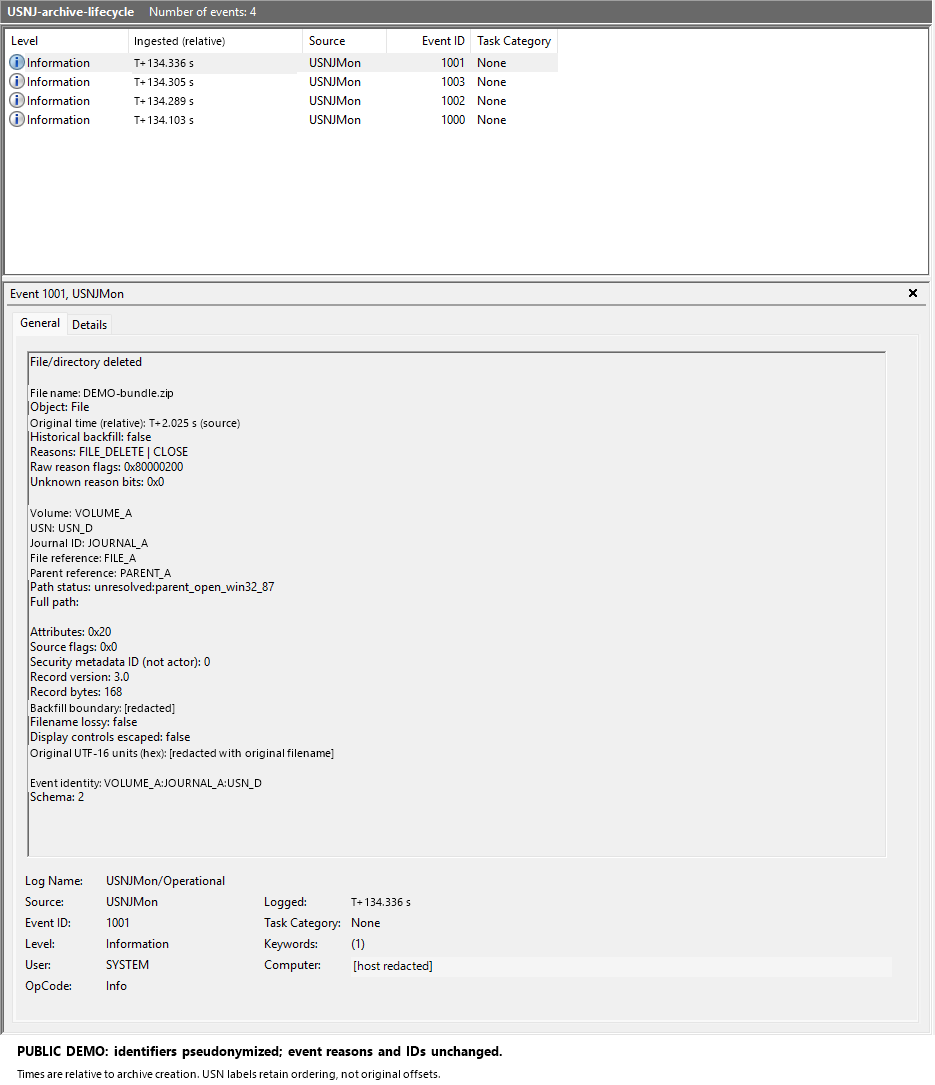
I ran a simulated exercise of staging and cleanup while USNJMon was running. The archive was renamed from .tmp to .zip, and everything was removed. File IDs were used to connect the creation, rename, and deletion records. Sysmon captured evidence as well, but USNJMon provided independent confirmation of the file changes. The following screenshot shows one of several events logged during the exercise. The identifiers have been redacted.
Limitations
There are a few limitations that are worth calling out:
- No process or user attribution: USN Journal records do not identify the process or user responsible for a change.
- Incomplete historical context: Older records can be removed as the journal wraps, and the journal can be deleted and recreated. Collection gaps can also lead to missing events if records are no longer available when collection resumes.
- Not one record per operation: Repeated operations can be accumulated into reason flags rather than recorded individually, so the journal is not a complete audit trail of every file operation.
- Full paths may be unavailable: Records contain filenames and parent references, not complete paths. Resolving a path requires additional context and may fail, especially after deletion. The screenshot above shows an unresolved parent and an empty full path.
- Timestamp precision has limits: The timestamp belongs to the journal record, not necessarily to each individual operation represented by its accumulated reason flags.
- Not guaranteed to be real-time: Event collection and forwarding can introduce delays; the time an event arrives is not necessarily the time of the underlying file activity.
References
- Microsoft: Change Journal Records
- Microsoft: USN_RECORD_V2 structure
- Microsoft: USN_RECORD_V3 structure
- Velociraptor documentation
-
Curated is my word for vibe-coded. ↩