

Banished to the Shadow Realm: Mutation of the Volume Shadow Copy for anti-forensics
Introduction
The Volume Shadow Copy Service (VSS) coordinates the creation of volume snapshots that backup and recovery tools can use to recover earlier data. Windows has its own implementation but it is designed with 3rd party integration as well. It is supported on the following Windows versions:
- Client: XP, Vista, 7, 8, 8.1, 10, and 11.
- Server: 2003/2003 R2, 2008/2008 R2, 2012/2012 R2, 2016, 2019, 2022, and 2025.
The VSS coordinates requesters, writers, and providers to create these snapshots:
- Requesters determine when/what is copied.
- Writers ensure data consistency prior to the snapshot.
- Providers create and maintain the snapshot.
The System Restore feature of Windows is an example of a feature that uses VSS:
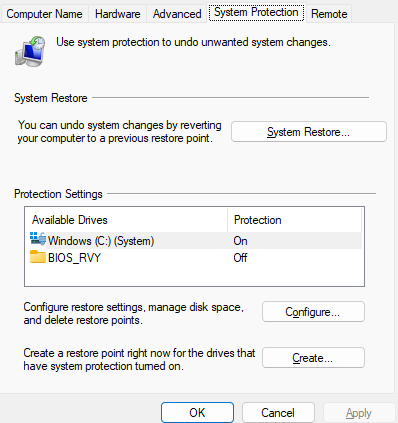
There are pre-existing tools like vssadmin, vshadow, and diskshadow which can
be used to delete shadow copies. The following table outlines their features:
| Tool | Primary purpose | Key features |
|---|---|---|
vssadmin |
Basic VSS administration. | List shadow copies, writers, providers, volumes, and shadow storage; delete shadow copies; resize shadow storage. |
vshadow |
Windows SDK command-line tool and sample for exercising VSS functionality. | Create, query, and delete shadow copy sets; expose copies locally or remotely; inspect writer status and metadata; import copies and perform restore or revert operations. |
diskshadow |
Interactive and scriptable VSS management. | Create, list, and delete shadow copies; expose persistent copies as drive letters, shares, or mount points; coordinate backup/restore sessions; import copies, break sets, or revert volumes. |
None of these tools permit single file CRUD (Create, Read, Update, Delete) edits
to the shadow copy.
vshadow and diskshadow support breaking hardware-provider snapshots into
potentially writable volumes but those volumes then cease to be VSS managed.
When shadow copies are enabled, they can be used as forensic evidence that a file existed and may even allow for that file to be restored if it was wiped. Tools like KAPE or Arsenal Image Mounter can be used to examine shadow copies.
For this reason, shadow copies have been a target for anti-forensics. Defenders
should be on the alert when whole client-accessible shadow copies are
removed, which can be done with a command like:
vssadmin delete shadows /all /quiet. The issue is that this anti-forensics
technique is a heavyhanded operation and removes the entire
snapshot. What if there was a tool that was a bit more surgical?
I am introducing a proof-of-concept called shadow-realm which supports
CRUD file operations on a target shadow copy
for a given volume. The purpose of this post and PoC is to raise awareness
about fine-grained methods of shadow copy manipulation.
The shadow-realm source code is available on GitHub.
shadow-realm
This tool has been tested on live and virtual volumes for:
- Server 2022
- Windows 11
The following commands are supported:
| Command | What it does |
|---|---|
create |
Creates a new file from a local --source file. Never overwrites an existing name. |
read |
Writes exact file bytes to stdout, or to a new local --output file. Never remounts or overwrites an output file. |
update |
Replaces an existing file’s entire contents from --source, including truncation. Not atomic. |
delete |
Deletes one existing file name. |
For write operations, the following actions take place:
flowchart LR
    A["Validate"] --> B["Lock/dismount"]
    B --> C["Enable write"]
    C --> D["Reopen"]
    D --> E["Perform operation"]
    E --> F["Restore read-only"]
Here is a demonstration of it in action:
PS> shadow-realm.exe debug inspect --snapshot 2
Target: \\?\GLOBALROOT\Device\HarddiskVolumeShadowCopy2
GPT attributes: 0xf000000000000000
SHADOW_COPY: true
READ_ONLY: true
Driver writable status: false

PS> shadow-realm.exe create --snapshot 2 --file 'Demo\new.bin' --source '.\payload.bin' --confirm-lab
Target: \\?\GLOBALROOT\Device\HarddiskVolumeShadowCopy2
Source: .\payload.bin (256 bytes)
New file: \\?\GLOBALROOT\Device\HarddiskVolumeShadowCopy2\Demo\new.bin (parents must already exist)
Original attributes: 0xf000000000000000
Requesting temporary writable attributes: 0xe000000000000000
Locking the selected shadow device; busy snapshots will not be force-dismounted.
Dismounting the locked shadow filesystem.
Shadow-device handle closed and reopened.
Snapshot root is accessible after reopen.
Driver reports writable; attempting the requested file operation.
Locking the selected shadow device; busy snapshots will not be force-dismounted.
Dismounting the locked shadow filesystem.
Shadow-device handle closed and reopened.
Snapshot root is accessible after reopen.
Remount completed; original driver attributes restored: 0xf000000000000000. Filesystem integrity is not established.
File operation completed; original read-only driver attributes restored. This is not rollback or proof of filesystem integrity.

PS> shadow-realm.exe read --snapshot 2 --file 'Demo\new.bin' --output '.\created-export.bin'
Target: \\?\GLOBALROOT\Device\HarddiskVolumeShadowCopy2

PS> shadow-realm.exe update --snapshot 2 --file 'Demo\update.bin' --source '.\short.bin' --confirm-lab
Target: \\?\GLOBALROOT\Device\HarddiskVolumeShadowCopy2
Source: .\short.bin (2 bytes)
Selected file: \\?\GLOBALROOT\Device\HarddiskVolumeShadowCopy2\Demo\update.bin
Size: 256 bytes; hard links: 1
[... file identity and writable-remount logging omitted ...]
Driver reports writable; attempting the requested file operation.
[... read-only remount logging omitted ...]
Remount completed; original driver attributes restored: 0xf000000000000000. Filesystem integrity is not established.
File operation completed; original read-only driver attributes restored. This is not rollback or proof of filesystem integrity.

PS> shadow-realm.exe delete --snapshot 2 --file 'Demo\delete.bin' --confirm-lab --confirm-delete
Target: \\?\GLOBALROOT\Device\HarddiskVolumeShadowCopy2
Selected file: \\?\GLOBALROOT\Device\HarddiskVolumeShadowCopy2\Demo\delete.bin
Size: 256 bytes; hard links: 1
[... file identity and writable-remount logging omitted ...]
Driver reports writable; attempting the requested file operation.
Deletion completed and selected name is absent: \\?\GLOBALROOT\Device\HarddiskVolumeShadowCopy2\Demo\delete.bin
[... read-only remount logging omitted ...]
Remount completed; original driver attributes restored: 0xf000000000000000. Filesystem integrity is not established.
File operation completed; original read-only driver attributes restored. This is not rollback or proof of filesystem integrity.

PS> shadow-realm.exe debug inspect --snapshot 2
Target: \\?\GLOBALROOT\Device\HarddiskVolumeShadowCopy2
GPT attributes: 0xf000000000000000
SHADOW_COPY: true
READ_ONLY: true
Driver writable status: false
shadow-realm uses the windows-sys Rust bindings and the standard filesystem
APIs. A shadow copy is opened with CreateFileW pointing to the NT device
path \\?\GLOBALROOT\Device\HarddiskVolumeShadowCopyN where N is the shadow
copy number. This handle can then be passed to DeviceIoControl with various
control codes to perform the required actions to enable editing the shadow
copy. The table of control codes and their action is as follows:
| Control code | Action |
|---|---|
IOCTL_VOLUME_GET_GPT_ATTRIBUTES |
Read the shadow volume’s read_only/shadow_copy flags. |
IOCTL_VOLUME_SET_GPT_ATTRIBUTES |
Change the volume’s flags. |
IOCTL_DISK_IS_WRITABLE |
Query if device self-reports as writable. |
FSCTL_LOCK_VOLUME |
Obtain exclusive access. |
FSCTL_DISMOUNT_VOLUME |
Unmount the current filesystem, which is used when changing attributes to ensure state is transitioned properly. |
FSCTL_UNLOCK_VOLUME |
Release exclusive access. |
Once the volume flags are changed and the volume is remounted as writeable, the shadow copy volume can be edited with normal filesystem operations. Afterwards, the shadow copy attributes restored.
One approach to detecting this would be to look for file operations or attribute modifications which target the shadow copy device path.
Happy hunting! You can grab a copy of shadow-realm from the
v0.5.0 experimental Windows x64 release.
Limitations
shadow-realm makes no guarantee about the usability of shadow copies after
mutation. It also hasn’t been tested against other 3rd party providers.